Shipping & VAT
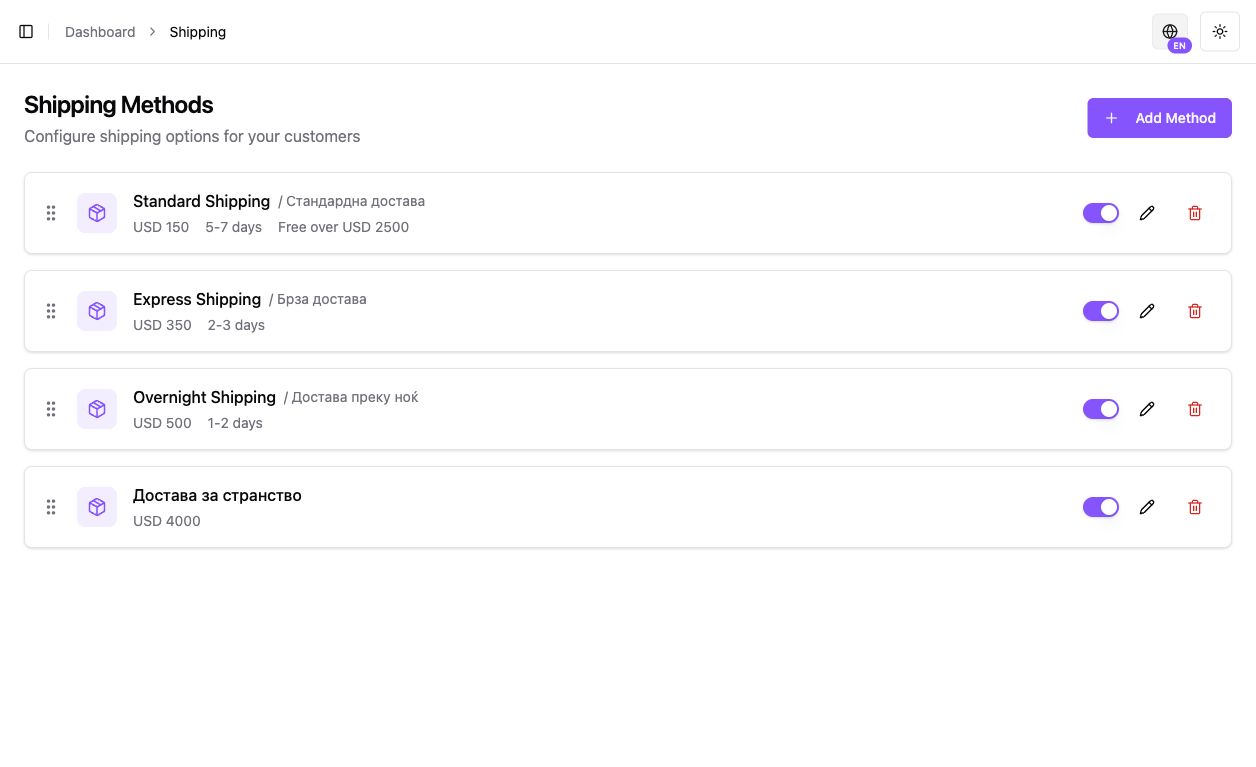
Configure Business delivery
Section titled “Configure Business delivery”- Open Settings → Shipping and review the store’s available delivery methods, prices and coverage.
- In the product editor, review Shipping → Shipping type and choose the appropriate supported Business method. Confirm weight and other fields where shown.
- Test a covered and uncovered buyer address in an authorized TEST flow before publishing delivery promises.
- After actual dispatch, keep shipment/tracking information in the order accurate. Shipping fees, buyer tax and payment holds are distinct.
If checkout offers no method, compare product shipping type and destination coverage. Non-MK Business tax setup follows its actual country; UJP is MK-only. Individual digital products require no shipping and do not use this Business workflow.
This guide covers Business Commerce. For Individual MoR, use the separate guide.
Shipping and tax directly affect the final amount shown to the customer. Configure them before live selling and always run a realistic checkout test.
Shipping methods
Section titled “Shipping methods”In Settings → Shipping you can create a method with:
- name and description;
- price;
- minimum and maximum delivery estimate;
- always-free shipping;
- an order-value threshold for free shipping;
- active/inactive status.
Product fulfillment type
Section titled “Product fulfillment type”A product can use:
- standard shipping;
- free shipping;
- digital fulfillment with no physical shipping;
- pickup only.
Physical products can also include weight and dimensions.
Free shipping
Section titled “Free shipping”Free shipping can come from the product, the shipping method, or an order-value threshold. Verify the final calculation at checkout.
The existing MK Business tax-class configuration includes 18%, 10%, 5%, and exempt options. These are not universal rates for AL, RS, BA or international buyers. Use the actual country-specific configuration and reviewed tax treatment; Individual uses Stripe Tax.
Kordiva applies the tax class configured in the system, but the merchant remains responsible for selecting the correct tax treatment. Consult an accountant or tax adviser when unsure.
Pre-launch check
Section titled “Pre-launch check”- Choose a physical product.
- Add it to cart.
- Check which shipping methods appear.
- Confirm free shipping activates only when intended.
- Verify tax calculation.
- Verify the final total before payment.